#!/usr/bin/python
from ftplib import FTP
import sys
print "hello world"
site = 'ftp.example.com'
ftp = FTP(site)
print 'Logging in to '+site
print ftp.login('myname', 'passwd')
directory = '~/public_html/'
print 'Changing to ' + directory
print ftp.cwd(directory)
for myfile in sys.argv:
ftp.storbinary("STOR " + myfile, file(myfile, "rb"))
print ftp.retrlines('LIST')
print ftp.close()
Showing posts with label python. Show all posts
Showing posts with label python. Show all posts
Tuesday, May 20, 2014


Thursday, June 27, 2013
MD5 Python
>>> import urllib, hashlib
>>> me = hashlib.md5('hello')
>>> print me
<md5 HASH object @ 0x10568d970>
>>> print me.hexdigest()
5d41402abc4b2a76b9719d911017c592

Sunday, May 6, 2012
Python: Error Handling
import traceback
def formatExceptionInfo(maxTBlevel=5):
         cla, exc, trbk = sys.exc_info()
         excName = cla.__name__
         try:
             excArgs = exc.__dict__["args"]
         except KeyError:
             excArgs = ""
         excTb = traceback.format_tb(trbk, maxTBlevel)
         return (excName, excArgs, excTb)

try:
         x = x + 1
except:
         print formatExceptionInfo()
Thursday, May 3, 2012
Thursday, January 19, 2012
Print just the name of the running Python program
#!/usr/bin/env python
import sys
import os
for i in sys.argv:
        print i
print sys.argv[0]
print os.path.basename(sys.argv[0].split(".")[0])
#>bin/test.py 56 555
bin/test.py
56
555
bin/test.py
test
Sunday, January 1, 2012
MySQL Connect in Python
#!/usr/bin/env python
import pymysql

conn = pymysql.connect(host='localhost', user='root', passwd='cyrushellborg666', db='brewing')
cur = conn.cursor()
cur.execute("SHOW TABLES")
# print cur.description
# r = cur.fetchall()
# print r
# ...or...
for r in cur:
   print r
cur.close()
conn.close()
Friday, December 30, 2011
Basic timer in Python
#!/usr/bin/env python


import time
import threading

class Timer(threading.Thread):
  def __init__(self, seconds):
   self.runTime = seconds
   threading.Thread.__init__(self)
  def run(self):
   time.sleep(self.runTime)
   print "Buzzzz!! Time's up!"

class CountDownTimer(Timer):
  def run(self):
   counter = self.runTime
   for sec in range(self.runTime):
    print counter
    time.sleep(1.0)
    counter -= 1
   print "Done."


class CountDownExec(CountDownTimer):
  def __init__(self, seconds, action):
   self.action = action
   CountDownTimer.__init__(self, seconds)
  def run(self):
   CountDownTimer.run(self)
   self.action()

def myAction():
  print "Performing my action..."


c = CountDownExec(10, myAction)
c.start()
#>./timer.py
10
9
8
7
6
5
4
3
2
1
Done.
Performing my action...
Friday, July 1, 2011
Pad and sort list of IP numbers
L = ['123.76.9.2', '125.76.9.3', '123.76.10.12', '92.93.3.79', '92.93.3.78', '222.222.222.222', '222.222.1.222']
L = sorted([".".join(['%03d' % int(j) for j in i.split('.')]) for i in L])
print L
Saturday, June 18, 2011
In list of numbers, find each pair that equals 100
Yes I know this has no graceful error protection for user input, wanted the example code to focused on problem space.
#!/usr/bin/env python
import random
import sys
X=int(sys.argv[1]) # e.g. enter 100 on the command line
print "In list of numbers, find each pair that equals " + str(X)

myNumbers = []
matched = []
for i in range(1,X):
 myNumbers.append(random.randrange(0,X))

for i in myNumbers:
 A=myNumbers.pop()
 for j in myNumbers:
  if A != False:
   try:
    if ((A+myNumbers[j]) == X):
     B=myNumbers[j]
     del myNumbers[j]
     matched.append([A, B])
     A = False
   except:
    TypeError

for i, j  in enumerate(matched):
 if ((i>0) and (i % 5 == 0)):
  print j
 else:   print j,

print
print "length of remaining unmatched numbers list is " + str(len(myNumbers))
print "length of remaining matched numbers list is " + str(len(matched))
Monday, October 5, 2009
ipserver.py
#!/usr/bin/env python
#
#
import os
import cgi


def main():
 print 'Content-Type: text/plain'
 print ''
        print os.environ['REMOTE_ADDR']


if __name__ == "__main__":

 main()
Monday, June 16, 2008
Integer division in Python 3.0
>python
Python 2.5.1 (r251:54863, Feb  4 2008, 21:48:13)
[GCC 4.0.1 (Apple Inc. build 5465)] on darwin
Type "help", "copyright", "credits" or "license" for more information.
>>> 200/400
0
>>> 200.0/400
0.5
>>> from __future__ import division
>>> 200/400
0.5
>>> 200//400
0
>>> print "In Python 3.0 200/400 will yield 0.5"
In Python 3.0 200/400 will yield 0.5
>>>
Monday, May 26, 2008
Easy Access to Python
Goal: Have methodology for quickly accessing anything about Python. While programming, do not have completed thought process without aid of computer stored information.
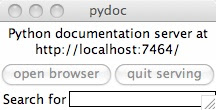
>pydoc -g
|
|
+--+ opens Tkinter window
 |
|
+-+ open browser
|
|
+ Python: Index of Modules
|
|
+-+ open browser
|
|
+ Python: Index of Modules
http://python.org/doc/2.5/lib/development.html
 |
|
+-+ open browser
|
|
+ Python: Index of Modules
|
|
+-+ open browser
|
|
+ Python: Index of Modules
Friday, May 23, 2008
NSLOOKUP in Python
from socket import gethostbyaddr

def nslooky(ip):
      try:
           output = gethostbyaddr(ip)
           return output[0]
     except:
           output = "not found"
           return output

 your_ip = request.META.get('REMOTE_ADDR')
# above is Django module object
 your_name = nslooky(your_ip)
 Original code by Cluther
Thursday, May 22, 2008
Wednesday, May 21, 2008
Lance's Django/Python Powered iMac Web Server
My home server is where I'm learning Python and Django. I'm creating content that shows the Python/Django code and resulting HTML.
See it here-->http://64.81.169.244/
See it here-->http://64.81.169.244/

|

|


|
Sunday, April 13, 2008
Friday, April 11, 2008
Thursday, April 3, 2008
Where are the Python modules in this computer?
Start you python command prompt, and type:
>>import sys
>>sys.path
( it will print out a list of directories)
Another way is write a python script that prints the list out a little prettier:
#!/usr/bin/env python
import sys

for x in sys.path:
        print x
# add to the list of paths with this:
a="/Users/lance/bin/"
sys.path.append(a)
Wednesday, April 2, 2008
Python URLLIB
This is the most useful resource I've found on URLLIB: http://blog.doughellmann.com/2008/03/pymotw-urllib.html
Sunday, February 10, 2008
Subscribe to:
Posts (Atom)